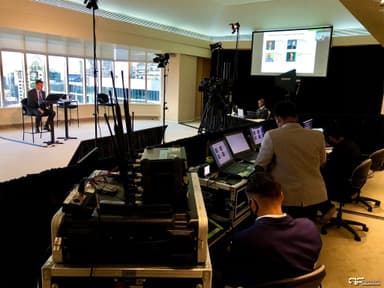
A hybrid event is one event with two audiences: people in the room and people watching and taking part online, both following the same program at the same time.
That sounds simple. In practice it changes how the room is built, how the agenda runs, how speakers present, and what the event costs. This guide explains what a hybrid event actually is, how it differs from formats that get confused with it, when it is worth doing and when it is not, and what organizing one involves at a high level.
What Is a Hybrid Event?
A hybrid event combines a live, in-person event with a virtual audience that can see, hear and participate in real time. The online audience is not watching a recording after the fact. They are part of the event while it happens.
The word that matters is "participate." A true hybrid event lets remote attendees ask questions, answer polls and follow a program planned with them in mind. Speakers can be on either side of the screen, on stage or joining remotely.
Hybrid vs In-Person, Virtual and Livestream-Only
These terms get used loosely, and the differences affect budget and planning, so it is worth being precise.
In-person event
Everyone is in the same place. The AV serves the room: microphones, speakers, screens, lighting. Anyone who cannot travel simply misses it.
Virtual event
Everyone is online. There may be a studio or a set where presenters gather, but there is no live audience in a venue. The production serves the camera and the platform.
Livestream or simulcast only
There is an in-person event, and a camera feed of it goes out online. Remote viewers can watch, but they cannot really take part. The program is designed for the room, and the stream is a window into it. This is useful and often cheaper, but it is not a hybrid event.
Hybrid event
There is a live audience and an online audience, and both are designed for. Remote viewers can interact, remote presenters appear on the room's screens and the stream at once, and the run of show accounts for both groups. The production serves the room and the camera at the same time, which makes hybrid the most demanding of the four.
A few things a hybrid event is not:
- A phone propped on a tripod at the back of the room
- A recording posted online after the event
- A program where the online audience is an afterthought
When a Hybrid Event Is Worth It
Hybrid makes sense when the value of reaching people outside the room is higher than the extra cost and complexity. Common signs:
- Part of your audience genuinely cannot attend. Staff in other offices or regions, members spread across the province, or people who cannot travel for family, health or cost reasons.
- Your speakers are spread out. If key presenters cannot be in the room, a hybrid setup lets them present properly instead of appearing as a frozen video call.
- Room capacity is the limit. When the venue holds fewer people than want to attend, an online tier lets you say yes to more of them.
- The content has a life after the event. Training, research presentations, leadership updates and keynotes are often worth recording and reusing.
- Sponsors or stakeholders want wider reach. An online audience can add real value to a sponsor package if it is planned into the offer.
When It Is Not Worth It
Hybrid is not automatically better. It can be the wrong choice when:
- The event is about the room. Galas, parties, networking receptions and many celebrations depend on being there. A stream of people mingling is rarely worth watching.
- The content is confidential. Some internal or sensitive sessions should not be broadcast at all.
- The online audience would be tiny. If only a handful of people would join remotely, a simple livestream, or a recording shared afterward, may serve them well enough at a fraction of the cost.
- The budget cannot support it properly. A poorly produced hybrid event can be worse than none. Remote attendees who cannot hear the speaker remember that more than anything said on stage.
The Real Benefits of Hybrid Events
When it fits the event, hybrid delivers benefits that are hard to get any other way.
Reach
A common worry is that adding an online option will split your audience and shrink the room. In practice, hybrid usually adds people who were never going to attend in person rather than pulling people away from the venue. You keep the room and gain an audience you would otherwise miss.
Accessibility
Hybrid lowers barriers for people who find travel difficult, cannot sit through a full day in a venue, or need captioning or other supports that are easier to deliver online. If accessibility is a priority, pair your hybrid plan with an event accessibility checklist so both audiences are considered.
Content you can reuse
Every hybrid event is also a multi-camera recording. Sessions can become on-demand video, social clips, training material or promotion for the next event, and keep working long after the room is cleared.
Sponsor value
Sponsors want visibility and leads. A hybrid event can offer both audiences: branding on stage and on the stream, sponsored segments, mentions during transitions, and access to people who engaged online. This only works if sponsor deliverables for the online audience are defined up front. Our guide to event sponsorship packages covers how to structure that.
Data
In a room, you can count heads. Online, you can usually see who joined, which sessions they watched, when they left, and which questions or polls they engaged with, depending on the platform. That information helps you judge which content worked and shape the next event.
Flexibility and less travel
An event built to run in two places at once adapts more easily when a speaker cannot travel or attendance shifts late. Fewer people travelling also means lower costs for attendees and a smaller footprint.
The Real Costs and Trade-Offs
Hybrid is more than an in-person event with a camera added. Be realistic about what it takes.
- More production. Cameras, a switcher, a dedicated audio mix for the stream, encoding, graphics, and the crew to operate them, on top of the AV the room already needs.
- Two audience experiences to design. What works in the room, such as a long coffee break, a walk to breakout rooms, or an inside joke, often leaves remote viewers staring at an empty stage.
- Reliable internet is non-negotiable. Venue Wi-Fi is rarely enough. A stable wired connection with enough upload speed, kept separate from guest traffic, is essential. Our guide to event bandwidth requirements explains what to ask the venue.
- More rehearsal time. Remote presenters need to be tested in advance, and the handoffs between the room and the stream need to be practiced.
- A platform decision. Someone has to choose, set up and support the streaming or event platform, and help attendees who cannot get in.
- Engagement takes deliberate effort. Remote attendees can leave with one click. Without a host, interaction and pacing designed for them, attention drops quickly.
None of this rules hybrid out. It means budgeting honestly and deciding early.
Common Hybrid Event Formats
Hybrid is a format, not an event type, so it shows up in many kinds of events.
Conferences and research days
A stage program in a venue, broadcast to an online audience who can submit questions. Remote presenters may join on their own feeds and appear on the room's screens and the stream at the same time.
Town halls and all-staff meetings
Leadership presents from one location to staff in the room and across other offices. Live Q&A from both audiences is usually the heart of the event. These are classic internal hybrid events, where the goal is reaching everyone in the organization.
Sales kickoffs
A core team gathers in person while regional teams join online, often with breakouts or regional segments built in.
AGMs and member meetings
Members attend in person or remotely and can follow the business, ask questions and, where the organization's rules allow, take part in votes.
Launches and external events
Launches and customer events aimed outside the organization, with a smaller invited audience in the room and a larger one online.
How to Organize a Hybrid Event: An Overview
Organizing a hybrid event follows the same broad path as any event, with the online audience built in from the first decision. At a high level:
- Set the goal and decide if hybrid is right. Who needs to be reached, and why can they not be in the room? If the answer is weak, a simpler format may be better.
- Design the program for both audiences. Plan session lengths, breaks, Q&A and interaction with remote viewers in mind, and decide who will host for them.
- Choose a venue that can support it. Check the internet connection, power, room for cameras and a control position, and sightlines for both the audience and the cameras.
- Pick the platform. Match it to how your audience will join and what interaction you need. Simple is usually better than feature-heavy.
- Plan the production. Cameras, audio, lighting for camera, screens, remote presenter feeds, graphics, recording and a backup plan if the stream drops.
- Prepare and rehearse speakers. Test every remote presenter's audio and video in advance, and walk in-room speakers through where the cameras are.
- Run the show and follow up. Manage both audiences live, then share recordings, review the data and gather feedback.
For a deeper walkthrough of each part, including how to engage the two audiences, see our hybrid event planning guide.
What a Hybrid Event Looks Like in Practice
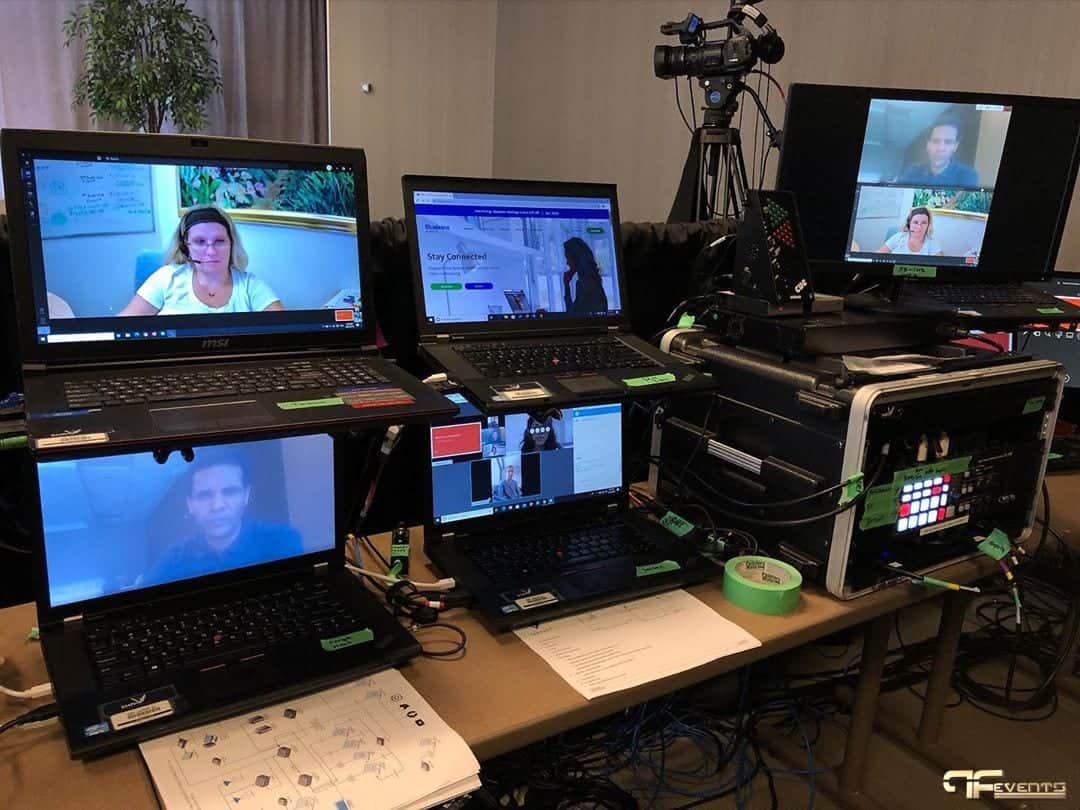
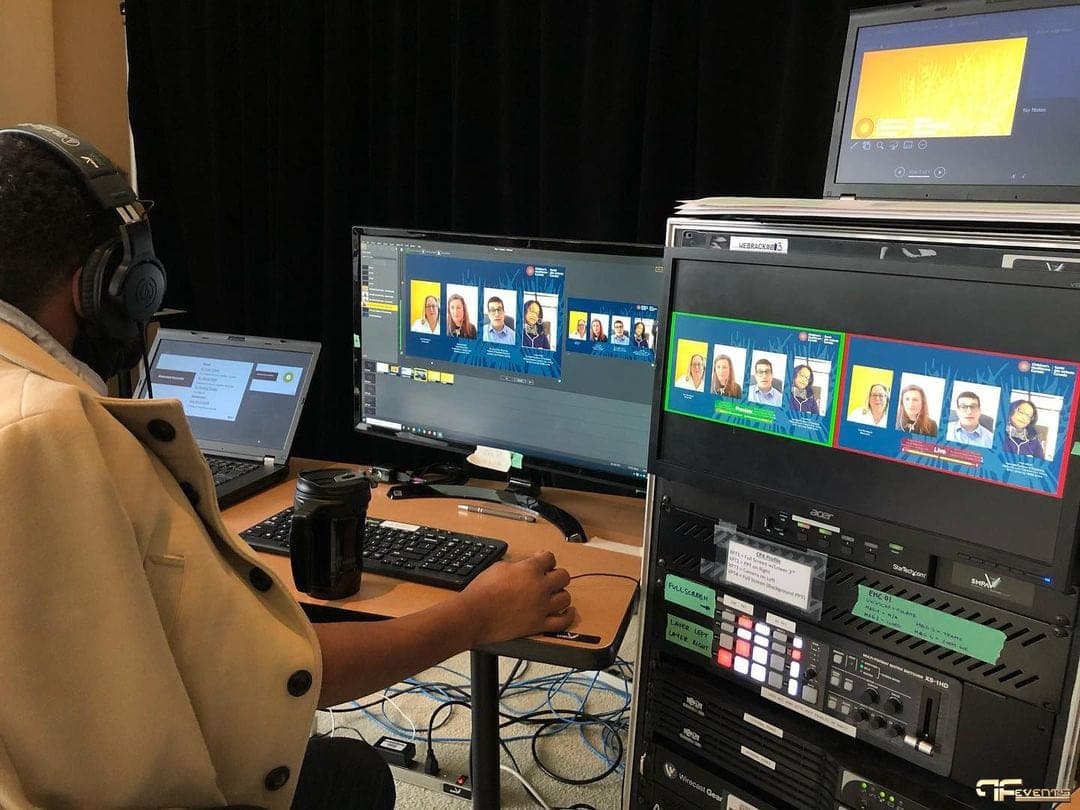
For UHN's Third Annual Toronto Lung Oncology Research Day at Vantage Venues, a small audience sat in the room while presenters and viewers took part online across seven sessions. Behind the scenes, there was one laptop for each remote presenter, so every speaker came in on their own feed and could appear on the room's screens and the stream at the same time. Questions from the online audience were collected on a page for each session and put to the speakers.
Broadcast lighting meant speakers looked as good on the stream as in the room. See the full setup in the UHN hybrid event case study.
Frequently Asked Questions
Is a hybrid event the same as a livestream?
No. A livestream lets online viewers watch. A hybrid event lets them take part, through questions, polls and a program designed with them in mind, and it may include remote presenters as well.
Does a hybrid event cost more than an in-person event?
Usually, yes. You are adding cameras, streaming, a platform, extra crew and more rehearsal on top of the in-room AV. Whether it is worth it depends on how much value the online audience brings.
Will offering an online option reduce in-person attendance?
Some people may choose to join online, but hybrid more often adds people who would not have attended at all. If the in-person experience matters, give people reasons to be in the room, such as networking, hands-on sessions or hospitality.
What is the most common thing that goes wrong?
Weak internet and weak audio. Remote viewers will forgive a simple camera angle, but not a stream that buffers or a speaker they cannot hear.
Planning a Hybrid Event in Toronto
Future's Past Events has spent over 20 years producing live events in Toronto and the GTA, and our hybrid event production brings the room and the online audience together in one show: cameras, audio, remote presenters, streaming and the crew to run it.
If you are deciding whether hybrid is right for your next event, or already planning one, get in touch and we can talk through the format, the venue and what it will take.
Related posts
Incorporate AV Equipment on your next Trade Show
Are you planning or managing a trade show? Are you wondering how to make a great impact and stand out from your competitors? Phases, audio systems, lighting, and technology such as LED video walls, large format HD screens, projection, or even TV monitors can be included on the commercial floor. Live demonstrations by…

Top 6 Benefits of Virtual Experiences
It’s a new world out there, however, there are still ways to create the event of exposure of the experience you want. If you are rethinking how to add virtual experiences to your live event, the good news is that you have a range of options to choose from in terms of access and execution. […]
How to Bring Your Live Events Back
Live events have started to come back and the Future’s Past Events team could not be happier! With that being said, virtual events have been important for the past year, so meeting with planners and everyone else in the event industry has been tailored to them. Going back to the live events in this new […]